Link Your Premium Subscription to Your Taskito Account
Link your Premium subscription to your Taskito account to use Premium on multiple devices, across platforms, and on Taskito Web.
Taskito Premium is purchased through your app store, but your Premium access follows your Taskito account once the subscription is linked.
Linking connects your store purchase to the account you sign in with on any supported device. After linking, Premium features — including sync, projects, repeating tasks, calendar import, and Taskito Web — are available wherever you are logged in with that account.
Why link your subscription?
Linking your subscription to your Taskito account helps in these situations:
- Use Premium on multiple devices — Sign in on your phone, tablet, or another device and keep Premium access.
- Access Taskito Web — Taskito Web is a Premium feature. Web access is granted through your Taskito account, not directly through the browser. If Premium works on mobile but not on web, linking is usually the fix.
- Use Premium across platforms — If you subscribed on one platform (for example, Google Play on Android) and want Premium on another (for example, iPhone or Web), link the subscription to your Taskito account first.
- Avoid store-account mismatches — If you use multiple Google Play accounts, the app store may not always report the correct purchase. Linking the subscription to your Taskito account makes Premium follow your login instead.
Does linking happen automatically?
In most cases, yes. When you purchase Premium and are signed in to your Taskito account, the app links your subscription automatically.
If Premium is active on your device but missing on another device or on Taskito Web, link it manually using the steps below. This usually means the purchase is tied to the app store on one device but not yet connected to your Taskito account.
How to link your subscription
- Sign in to your Taskito account on the device where you purchased Premium. Create an account first if you do not have one — see how to create an account.
- Open Workspace → Settings → Account.
- Tap Premium.
- If you see "Some of the purchases are not linked to your account", your subscription still needs to be linked.
- On the Payments page, tap the banner to link your subscription.
- Return to the Account page. When linking is complete, you should see "Your account has full premium access" with a checkmark.
Once this status appears, Premium should be available on any device or platform where you sign in with the same Taskito account.
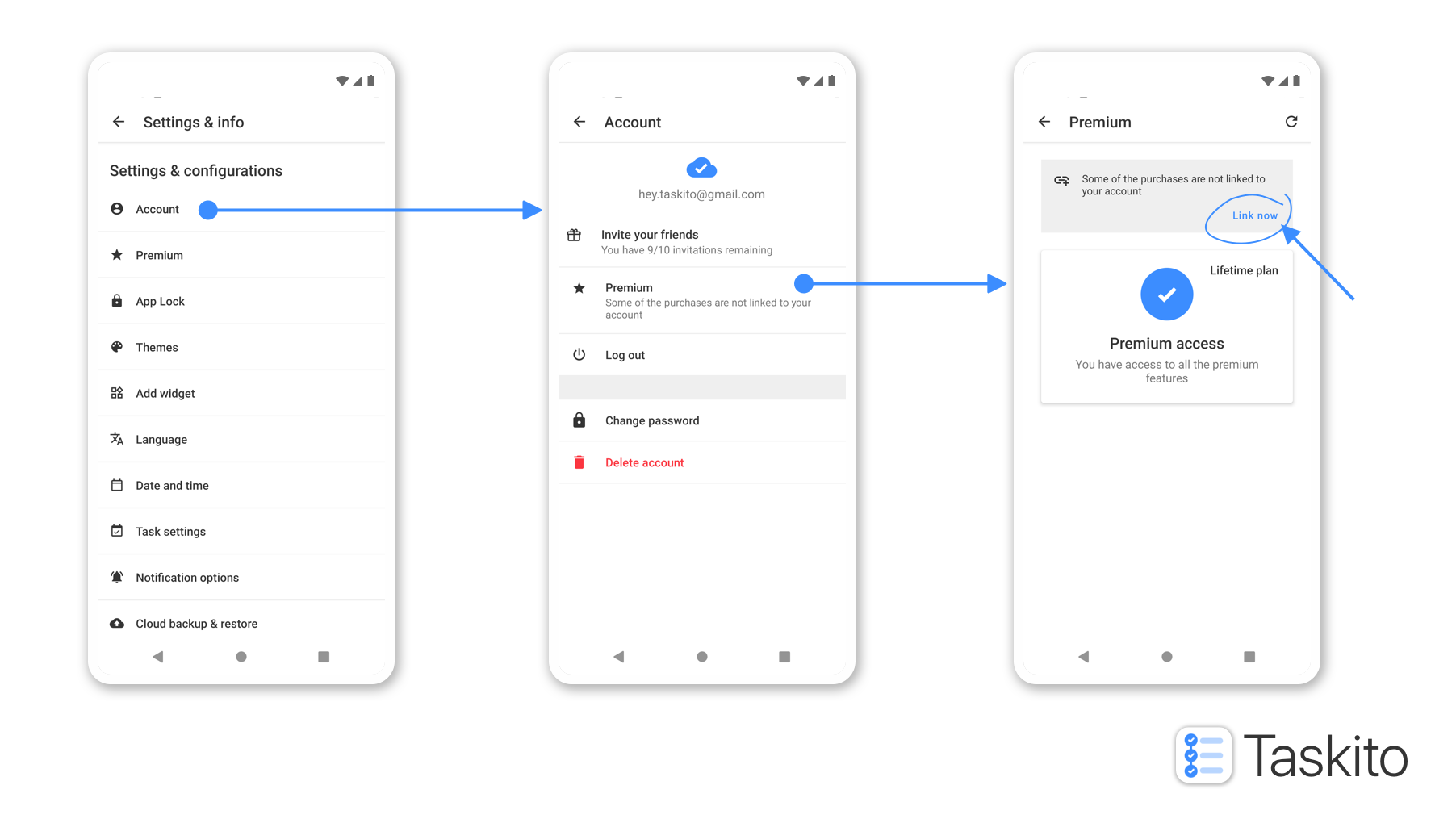
If your subscription is not linked, Taskito will prompt you from the Premium section in Account settings.
Once you have linked your subscription, the app should show the following Premium status on your account.
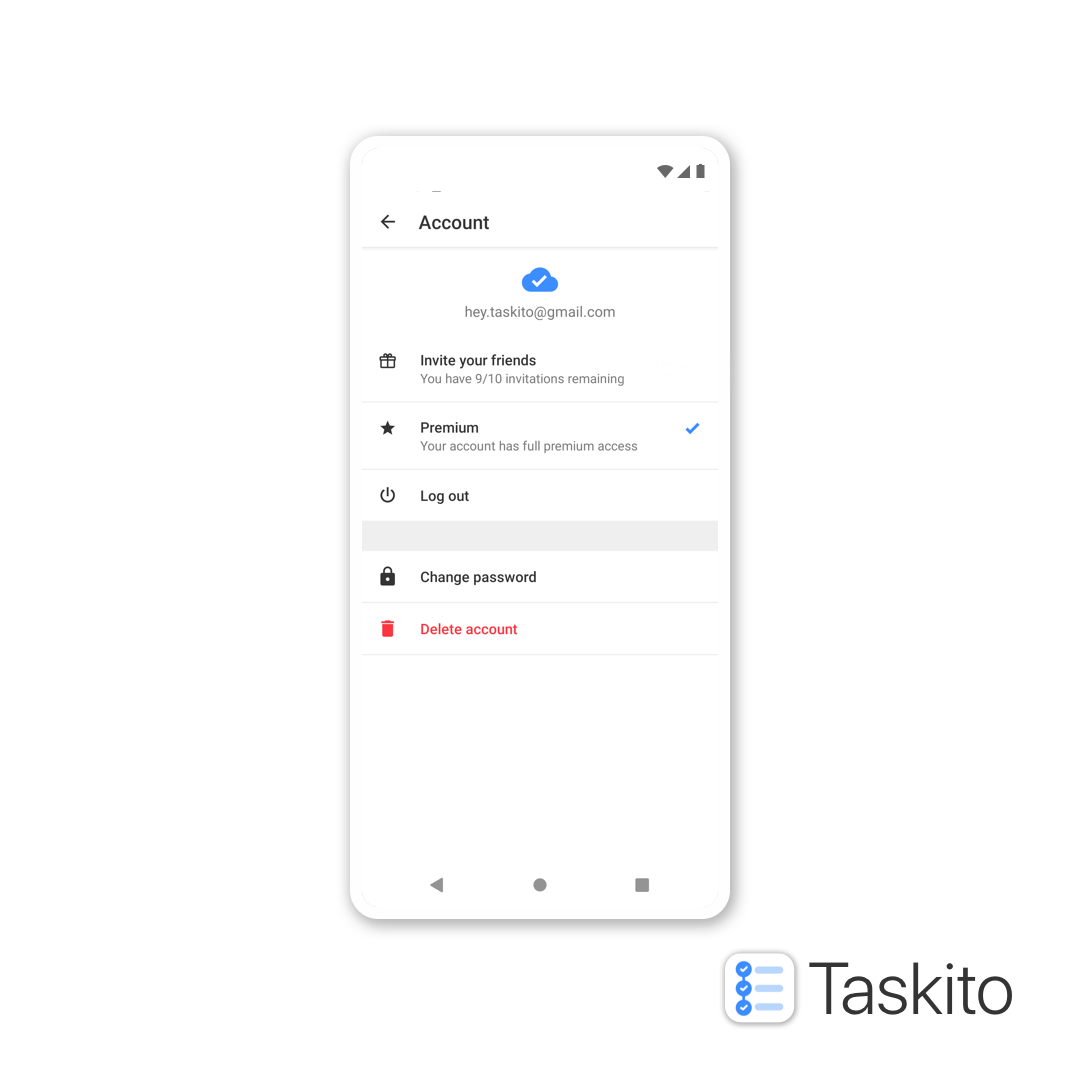
After linking, your account shows full premium access with a checkmark.
Using Premium on Taskito Web
Taskito Web requires an active Premium subscription linked to your Taskito account.
If Premium works in the mobile app but not on Taskito Web:
- Confirm you are signed in on web with the same Taskito account used on mobile.
- On mobile, open Account → Premium and check whether your subscription is linked.
- If it is not linked, complete the linking steps above on your phone.
- Sign out and back in on web, or refresh the page after linking.
Premium is managed through the mobile app or app store. Linking on mobile is what enables Premium access on web — the web app does not handle subscription purchases on its own.
For a full breakdown of Free vs Premium features and limits, see the Taskito pricing page.
Troubleshooting
Premium works on one phone but not another
Make sure you are signed in with the same Taskito account on both devices, and confirm the subscription is linked in Account → Premium.
I subscribed on Android but Premium is missing on iPhone or Web
Subscriptions are purchased through an app store, but Premium access travels with your Taskito account after linking. Link the subscription on the device where you purchased Premium, then sign in on the other platform.
I have multiple Google Play accounts
Google Play may send incorrect purchase data to Taskito. Linking your subscription to your Taskito account avoids this issue.
I purchased Premium on someone else's device
The subscription must be linked to your Taskito account — not the device owner's account — for you to use Premium on your own devices.
Once your subscription is linked, Premium features — including projects, repeating tasks, repeating reminders, calendar import, premium themes, and Taskito Web — are available wherever you sign in with your Taskito account.
Do you find Taskito helpful?
Support us by leaving a 5-star review on our app stores

Follow us on social media to get updates & tips about planning and productivity.